
Why PC-Formatted Memory Cards Can Fail During Recording

Experienced cinematographers often know that using a memory card formatted on a computer via a USB card reader can lead to issues such as:
Recording stopping unexpectedly during shooting
The contents of the memory card not appearing after filming
For this reason, it is widely recommended to always format memory cards inside the camera before use.
There are many possible causes of recording interruption or data corruption (see our previous blog post, “Long-Duration Recording Errors”), but the two major format-related causes are:
Improper initialization of the file system area
Incorrect partition configuration
In this chapter, we will focus on problems that occur when the file system is not properly initialized.
What You Need to Know First:
Basic Behavior of NAND Flash
To understand why these issues occur, it helps to briefly understand how NAND Flash — the storage medium inside memory cards — operates.
While specifications vary by manufacturer, a typical modern 64GB SD card may roughly look like this:

NAND Flash has several important characteristics:
Data can be written at the page level
Erasing can only be done at the block level
Already-written data cannot be overwritten directly
Because of these limitations, modern SD cards use Dynamic Mapping inside the Flash Translation Layer (FTL):
Instead of overwriting existing data
New data is written to a different free location
Only the address mapping is updated
After many updates, data becomes scattered across different blocks — a condition often called fragmentation. The controller later reorganizes data using background Garbage Collection (GC).
However, if power loss or an error occurs during this process, files may become corrupted.
Understanding the File System Structure
Next, let’s briefly look at how the file system works.
A 64GB SD card formatted with exFAT is typically divided into:
About 32MB (≈0.05%) → File system area (stores file location information)
About 99.95% → Data area (actual video recordings)
During recording, two completely different types of data are written:
1. Actual video data
2. File system data that manages file location and structure
These two types behave very differently:
Data Write Characteristics During Recording
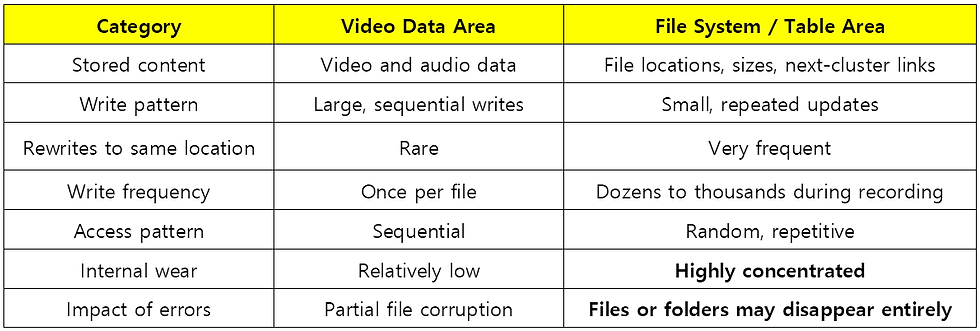
Video data is written only once, but the file system table is updated continuously throughout recording. As a result, after filming, the file system area is often heavily fragmented.
Why Does Formatting on a Computer Cause Problems?
Here is the key question:
Why can formatting on a computer lead to instability?
When observing the formatting process with a USB analyzer, we can see that a computer does not fully reinitialize the file system area. Instead, it overwrites only small portions of it in a scattered manner.

For example:
The total file system area is about 32MB
But only about 500KB of data is actually updated during a typical PC format
This means the file system area is not fully reset — it is partially overwritten on top of existing data, leaving the internal state more complex.
In this condition:
Internal management overhead increases
Garbage Collection becomes more likely
Sudden latency spikes may interrupt recording
In severe cases, the file system itself can become corrupted, making the card unreadable.
How OFFLOADER Batch Formatting Is Different
OFFLOADER’s batch card format feature is designed with NAND Flash behavior in mind.
It:
Properly reinitializes the file system area
Reduces internal management overhead
Helps maintain stable write performance during recording
This provides a level of formatting stability comparable to in-camera formatting.
Difference from Camera “Full Initialization”
Some high-end cameras offer a deep initialization feature that wipes not only the file system area but also the data area.
In such cases:
Data recovery may become impossible.
OFFLOADER formatting works differently:
The data area remains untouched
Only the file system area is reinitialized
This approach improves stability while still preserving the possibility of data recovery when needed.
Next Section
In the next chapter, we will look at another common cause of errors: problems caused by incorrect partition settings on memory cards.
#MemoryCardFormat #PCFormat #CameraReady #RecordingStability #FileSystem #NANDFlash #OFFLOADER16X #ClouZen


This article highlights an important technical issue that many creators and videographers overlook when recording data on PC-formatted memory cards. File system compatibility and improper formatting can easily lead to recording failures or corrupted footage, especially during long sessions. The explanation is simple yet informative, making it useful for both beginners and experienced users. Preventing data loss should always be a priority when working with digital storage devices. Reliable performance matters in every online activity, whether in media production or browsing trusted platforms. People searching for secure and trusted betting sites in india should also pay attention to system compatibility and platform reliability for a smoother overall experience online.